
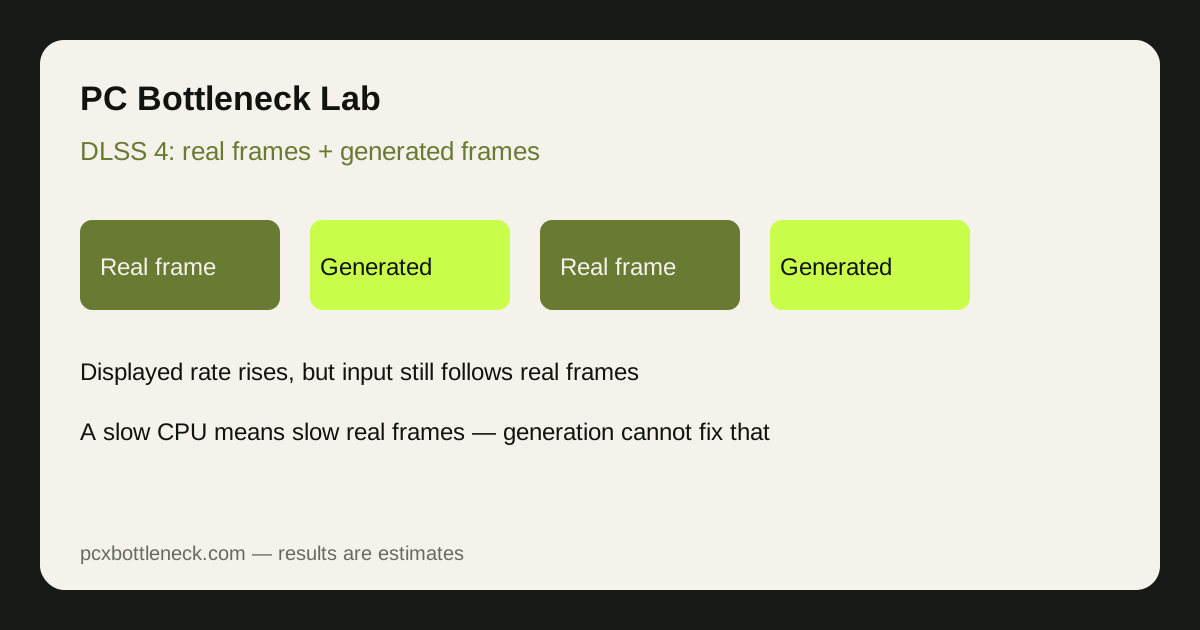
How does DLSS 4 multi frame generation work?
DLSS upscaling renders a game at a lower internal resolution and reconstructs a higher-resolution image, which lowers GPU load. Multi frame generation goes further: after the GPU renders real frames, it generates additional frames in between them, using motion data from the real frames. Motion therefore looks smoother, even though the game engine itself has not produced those extra frames.
That distinction is the whole story for bottlenecks. Upscaling mainly helps when the GPU is the limit, because it reduces the GPU's work per frame. Frame generation cannot create new game state: input, physics and game logic still advance only on real frames.
Why does a CPU bottleneck become more visible with frame generation?
Frame generation multiplies the displayed frame rate, which makes any CPU limit stand out in two ways. First, the gap between displayed smoothness and input responsiveness grows: motion looks fluid, but aiming and camera movement still respond at the slower real frame rate. Second, generated frames are only as good as the real frames they are built from. If real frames are sparse or uneven, generated frames inherit that unevenness and can show visible artefacts in fast motion.
| Situation | What frame generation does | What you actually feel |
|---|---|---|
| GPU-limited, healthy base frame rate | Smooths motion further | Smoother, responsive enough for most play |
| CPU-limited, low base frame rate | Raises displayed frame rate | Smoother-looking, but input still lags |
| CPU-limited, uneven frame times | Builds on uneven real frames | Artefacts and inconsistent feel in fast scenes |
As a rule of thumb, frame generation works best when the real frame rate is already comfortable, and helps least when it is low or stuttery. If your base frame rate is struggling, fix the CPU, RAM or settings problem first, using the method in how to check a CPU bottleneck. As a rough guide, a CPU-limited setup may show an estimated responsiveness gap in the region of 20–40% between displayed frame rate and felt responsiveness, which is why the on-screen number alone misleads.
When does multi frame generation help, and when does it hurt?
It helps most in story-driven, visually heavy games at higher resolutions, where the GPU is the limit and the base frame rate is already healthy. It also helps on high refresh displays, where extra displayed frames make panning visibly smoother.
It helps least, and can hurt the feel, in competitive games where input latency decides outcomes, in fast camera movements where generated frames show artefacts, and in any game where the CPU is already the limit. In competitive play, most players are better off with upscaling alone and a higher real frame rate from a stronger CPU. Our guide to CPU bottlenecks in esports versus AAA games explains why that split exists.
It also interacts with the GPU you own. A very fast GPU such as the one on the RTX 5080 bottleneck page is more likely to be CPU-limited at lower resolutions, which is exactly where frame generation feels least convincing. A mid-range GPU such as the RTX 5070 bottleneck page covers is more often GPU-limited, which is where generation helps most.
How should you set up DLSS 4 for a CPU-limited PC?
Set it up in order, and test each step in your own games. Changing everything at once makes it impossible to tell which setting helped.
- Fix the base first: lower CPU-heavy settings such as crowd density and draw distance, and confirm the real frame rate rises. If it does not, the limit may be cooling, RAM or background software.
- Add upscaling next: use DLSS upscaling at a quality preset that keeps the image sharp. This lowers GPU load and often raises the real frame rate, which also improves any generation added later.
- Add frame generation last: enable it only if the base frame rate is already comfortable and the game is not competitive. If input feels delayed, turn generation off and keep upscaling.
- Check latency tools: if your game or driver offers a latency-reduction mode, enable it alongside generation, since it narrows the gap between displayed smoothness and input response.
If you see high CPU usage with low GPU usage while generation is on, do not treat the high displayed frame rate as proof the bottleneck is gone. Turn generation off and judge the CPU limit from the base frame rate.
Is multi frame generation worth using in 2026?
Yes, for the right games: story-driven and visually heavy titles on a GPU-limited PC, where it genuinely smooths motion. No, as a fix for a CPU bottleneck: it papers over the displayed number while the underlying responsiveness stays limited.
The longer-term lesson is that as GPUs and generation get faster, the CPU matters more, not less, because the real frame rate becomes the floor under everything else. A balanced CPU, such as the one on the Ryzen 7 9800X3D bottleneck page, keeps that floor high, which makes every frame technology built on top of it work better.
Limitation: this guide is qualitative guidance with estimate ranges, not measured latency or frame-rate data for your games, drivers and display. Frame generation quality, artefacts and latency vary by game, driver version and settings. Test it in your own games with generation on and off before deciding.
Frequently asked questions
Does DLSS 4 frame generation fix a CPU bottleneck?
No. It raises the displayed frame rate by inserting generated frames, but game logic and input still advance on real frames produced by the CPU. A CPU-limited game looks smoother with generation on, yet still responds at the slower real frame rate.
Does frame generation increase input lag?
It can feel like it does, because input responds at the real frame rate while the display shows a higher generated rate. Latency-reduction modes narrow that gap, but they do not remove it, which is why competitive players often avoid generation.
Should I use frame generation in competitive games?
Usually not. Competitive games reward fast, consistent input response over smooth-looking motion, and generation adds displayed frames without adding real game updates. Upscaling alone, plus a stronger CPU, is generally the better route there. Keep generation for story-driven games where smoothness matters more than latency.
What base frame rate should I have before using frame generation?
A comfortable, steady base frame rate, where the game already feels playable without generation. If the base rate is low or stuttery, generation inherits that unevenness and can look worse. Fix the CPU, RAM or settings limit first. Test with generation off first, so you know the real frame rate you are building on.
Is DLSS upscaling better than frame generation for a weak CPU?
Upscaling is the safer first step, because it lowers GPU load and can raise the real frame rate, which helps a CPU-limited PC indirectly. Frame generation only helps once that real frame rate is already healthy, so use upscaling first and generation second.