
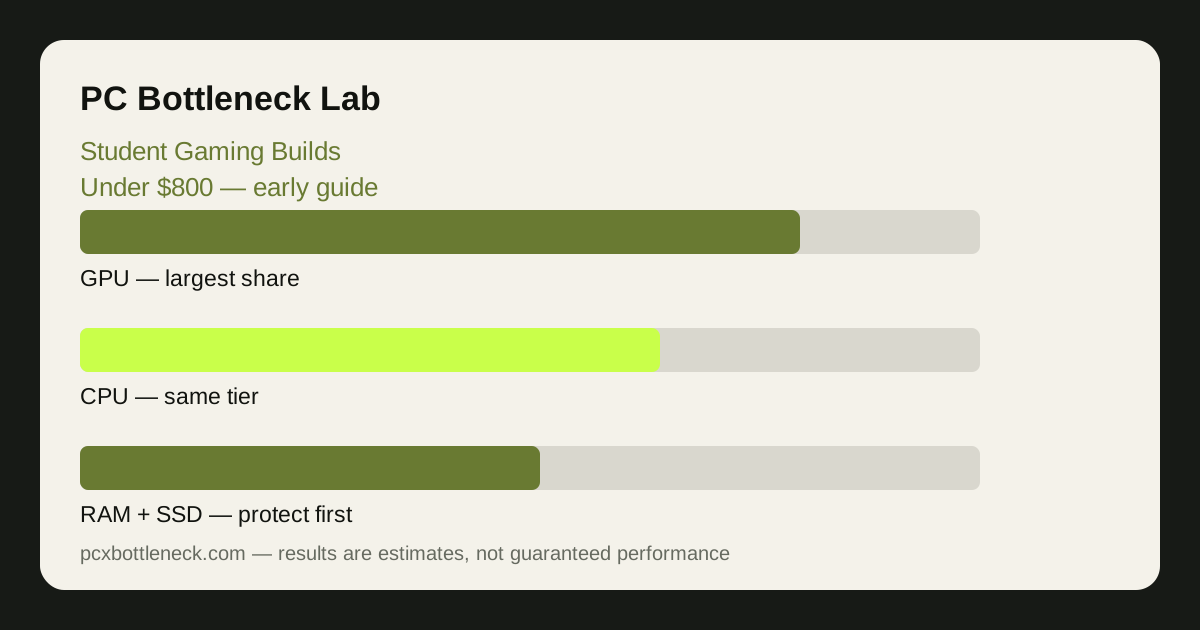
How to split an under-$800 budget
Start with the two parts that set the gaming balance: the CPU and the GPU together take the largest share, and they should be close in tier — a modest CPU with a modest GPU will always feel better than a strong GPU chained to a weak CPU, or a strong CPU with a GPU that cannot keep up. After those two, protect RAM and storage before anything decorative: 16GB of RAM in dual channel and a solid-state drive are not luxuries at this budget, they are the difference between a PC that feels fast and one that stutters.
A workable split in broad ranges is: the largest share to the GPU, the next share to the CPU, then RAM and storage, then the case and power supply, with the motherboard and cooling taking what remains. The exact split moves with the market, so treat these as proportions to aim for rather than fixed amounts — and if one part eats into the share of another, the balance is already breaking.
Do not forget the parts outside the tower. If the budget has to cover a monitor, keyboard and mouse as well, the tower budget shrinks, and the honest answer is to step both the CPU and GPU down a tier together rather than gutting one of them. A balanced lower tier beats a lopsided higher one every time.
| Build share | Budget range | Bottleneck note |
|---|---|---|
| GPU | Largest share | Sets 1440p and 4K pace; do not starve it |
| CPU | Second-largest share | Sets 1080p pace; keep it in the same tier |
| RAM, 16GB dual channel | Modest share | Single-channel RAM throttles any pairing |
| Storage, SSD | Modest share | Avoids load stutter; a full drive slows down |
| Case, PSU, motherboard | Remaining share | Cheap PSU is a reliability risk, not a saving |
CPU and GPU balance at student budgets
At this budget the most common mistake is buying a graphics card a tier above the CPU because a sale or a recommendation made it look like a bargain. At 1080p, where most student builds play, the CPU does a large share of the work per frame, so a modest CPU with a strong GPU will leave the GPU waiting while one CPU core runs flat out. The frame rate will not match the price of the card, and the money is wasted.
The safer pattern is a modern six-core CPU with a mid-range GPU, or a budget CPU with an entry-level GPU — pairs that sit in the same tier and share the load. Check any combination in Bottleneck Calculator at 1080p first, because that is where an imbalance at this budget shows up most clearly. At 1440p the same pairing will look more GPU-limited, which is normal and not a problem if your monitor is 1440p.
For a cheaper starting point built on the same method, see a balanced PC pair under $600 — the tiers are lower, but the balance-first logic is identical, and the same checks apply.
A PC that works for class as well as games
Coursework has its own performance needs, and they are easy to overlook when the gaming specs take over. Video calls, browser tabs, documents and research all reward fast storage, enough RAM, and a CPU that stays responsive under background load — the same things that stop games stuttering. That is why 16GB of dual-channel RAM and an SSD matter more for a student than RGB lighting or a fancy case: they help every task, not just games.
Think about noise and heat too, especially in a shared room or a dorm. A build with decent airflow and a sensible fan curve is quieter during study and cooler during gaming, and it will last longer. The summer guide cooling before the heat covers the free airflow checks that matter most in a small room.
Finally, plan for the semester, not just the first week. Leave a free RAM slot or a storage upgrade path if you can, keep some budget in reserve for a headset or a second monitor later, and buy from retailers with a clear return policy so a part that does not fit can go back.
What to skip, and what to buy used with care
Skip the extras that add cost without performance: elaborate lighting, an oversized case, a premium motherboard with features a student build will never use, and a cooler far beyond what the CPU needs. Each of those takes money from the CPU, GPU or RAM, where it would actually change how the PC feels.
Used parts can stretch the budget, but only with care. A used GPU can be good value if it has been tested, comes from a seller with a return option, and leaves enough budget for a reliable power supply — never pair a used card with a cheap unknown power supply. A used CPU is usually safer than a used GPU, because it has no fans or memory to wear out, but check compatibility with the motherboard first. Avoid used storage and used power supplies entirely; both can fail without warning and take your coursework with them.
If the choice is between a laptop and a desktop for student life, our comparison laptops vs desktops for students covers the trade-off in full, including thermals and upgradeability.
Limitation: this guide uses budget ranges, not claimed prices or discounts — component prices move with sales, region and availability, and a specific configuration that fits under $800 in one market may not in another. Re-check every part in the calculator and against current retailer pricing before you buy, and treat any single price you see quoted elsewhere as out of date until verified.
Frequently asked questions
Can you build a good gaming PC under $800?
Yes, if the budget is split by balance rather than by headline specs. A modern six-core CPU with a mid-range GPU, 16GB of dual-channel RAM and an SSD will play well at 1080p and handle coursework comfortably. The build fails when one part — usually the GPU — takes money from the CPU, RAM or power supply.
Should a student spend more on the CPU or the GPU?
Both, in the same tier. The GPU usually takes the largest single share, but the CPU must stay close behind it, because at 1080p the CPU sets the pace for many games. Spending heavily on one while starving the other creates a bottleneck that no setting can fix — check the pair in the calculator before you commit.
Is 16GB of RAM enough for a student build?
Yes, provided it is two sticks in dual channel rather than one. Dual-channel 16GB handles games, browser tabs, documents and video calls together; single-channel 8GB will stutter in games and feel slow in coursework. If the budget forces a choice, dual-channel RAM matters more than a slightly faster GPU.
Is a used GPU a good idea for a student build?
It can be, with care: buy from a seller with a return option, test the card thoroughly as soon as it arrives, and keep a reliable power supply in the budget. Avoid used storage and used power supplies, and never let a used card push you into a tier your CPU cannot feed — the balance check matters just as much for second-hand parts.
Do I need a monitor in the $800 budget?
Only if you do not already own one — but if you do, say so in the plan, because a monitor, keyboard and mouse shrink the tower budget significantly. In that case step the CPU and GPU down a tier together to stay balanced, rather than gutting one part to pay for the screen.