
How many watts? Add up the parts
A power supply calculator hides this arithmetic behind a form, but it is simple: every part has a power draw, and the two big ones — the graphics card and the CPU — account for most of it. Add those two first, then add a modest amount for everything else: motherboard, memory, storage, fans and USB devices. The total is your system's peak draw, and the supply should sit comfortably above it.
For the graphics card, use its published total graphics power: 250 W for an RTX 5070, for example. For the CPU, use its published power limit under load rather than its idle draw — a mainstream gaming CPU is typically in the 65–150 W range. Motherboard, RAM and storage together usually add roughly 50–80 W, and each fan adds a few watts. These are planning figures, not lab measurements, and they are deliberately rounded up.
Once you have the total, add headroom: multiply by roughly 1.25 to 1.5, or add 100–150 W, whichever is larger. Headroom covers transient spikes, future upgrades, and the fact that supplies run quieter and more efficiently away from their limit. A system that peaks at 450 W belongs on a 650 W unit, not a 500 W one.
A worked example: three typical builds
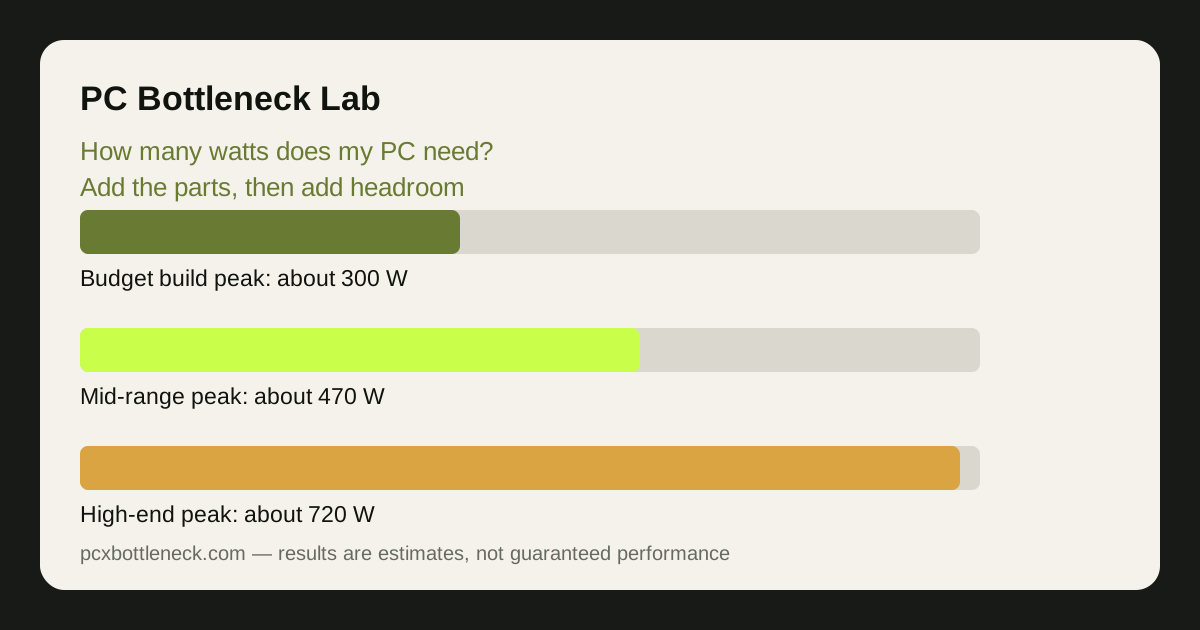
The table below adds up three common builds the same way, so you can see the method working and copy it for your own parts. The figures are planning estimates for peak gaming load.
| Part | 1080p budget build | 1440p mid-range build | 4K high-end build |
|---|---|---|---|
| Graphics card | Roughly 130 W | Roughly 250 W | Roughly 450 W |
| CPU under load | Roughly 90 W | Roughly 120 W | Roughly 150 W |
| Motherboard, RAM, storage | Roughly 60 W | Roughly 70 W | Roughly 80 W |
| Fans and extras | Roughly 20 W | Roughly 30 W | Roughly 40 W |
| Estimated peak total | Roughly 300 W | Roughly 470 W | Roughly 720 W |
| Recommended PSU | 550 W, good quality | 650 W ATX 3.1 | 1000 W ATX 3.1 |
Notice that the recommended PSU is always a step above the peak total. That gap is the headroom: it absorbs spikes, keeps the fan quiet, and leaves room for a stronger card later. Buying exactly the peak number is the most common sizing mistake.
Headroom, efficiency ratings, and what 80 Plus means
Power supplies are most efficient at roughly half load — another reason headroom pays off: a 650 W unit powering a 350 W system runs cooler and quieter than a 400 W unit near its limit. Efficiency is measured by the 80 Plus rating — Bronze, Gold, Platinum and so on — which says how much wall power reaches your parts instead of turning into heat. A Gold unit wastes less power than a Bronze one, but the rating says nothing about build quality or spike handling.
That last point matters most. A cheap unit can carry a Gold label and still use weak components, poor protections or thin cables. Before buying, look up a professional review of the exact model: reviewers test whether the unit delivers its rated power, handles spikes, and whether its protections actually work. The label is a starting point, not a verdict.
Also check the ATX version. ATX 3.1 units are built for the transient spikes modern graphics cards produce, and they include the native 12V-2x6 connector that current cards use. For a new build in 2026, ATX 3.1 is the sensible default, and our RTX 5070 PSU guide explains the connector in detail for that card.
How to check your answer at the wall
The best way to verify any calculation is to measure. A plug-in wall power meter costs little and shows the whole system's draw in real time: plug the PC in, run your most demanding game for ten minutes, and watch the highest reading. Multiply that wall figure by roughly 0.9 to allow for the PSU's efficiency, and you have the system's real internal draw — compare it with your estimate and the PSU's rating.
If the measured peak is above 80% of the PSU's rating, the unit is working hard: consider a larger one at the next upgrade, especially if you plan a stronger graphics card. If it is below half the rating, you have generous headroom and the unit will run quietly for years.
Finally, remember that wattage is only half the sizing question — the other half is balance. Once the power is sorted, run the build through the PC bottleneck calculator to check that the CPU and GPU are matched at your resolution, so the power you paid for turns into frames you can see.
Limitation: the figures in this guide are planning estimates, not measurements of your parts. Real draw varies with the exact model, the overclock, the game and the room temperature, so treat the calculation as a starting point and verify with a wall meter where it matters.
Frequently asked questions
How do I calculate how many watts my PC needs?
Add the graphics card's published power, the CPU's power under load, and roughly 50–80 W for the motherboard, RAM and storage, plus a few watts per fan. Then add 100–150 W of headroom. A typical mid-range gaming PC lands near 450–550 W at peak, so a good 650 W unit covers it.
Is a 650 W PSU enough for most gaming PCs?
Yes, for most mid-range builds with a card up to the RTX 5070 class and a mainstream CPU. High-end builds with a flagship card need more — check the worked example in this guide and add up your own parts rather than guessing.
What happens if my power supply is too small?
The PC usually shuts down or restarts under load, when the card's transient spikes push past what the unit can deliver. A unit that is far too small can also damage components — so a quality PSU with headroom is cheap insurance.
Does a bigger PSU use more electricity?
No. A power supply only delivers what the PC asks for, so a 1000 W unit in a 400 W system uses about the same wall power as a 650 W unit — sometimes slightly less, because it runs in its most efficient range. The rating is a maximum, not a constant draw.
Is 80 Plus Gold worth it over Bronze?
For a PC that runs many hours a day, yes — Gold wastes less power as heat, which means a quieter fan and a slightly lower bill. But the rating alone does not prove quality, so check a professional review of the exact model before buying.