
Key takeaways
- PCIe 5.0 x16 carries about 63 GB/s per direction, double PCIe 4.0 x16.
- An RTX 5090 loses only 1 to 3 percent on PCIe 4.0 x16.
- PCIe 5.0 x8 equals PCIe 4.0 x16, so lane count matters as much as generation.
- Cards wired for x8 only, like the RTX 5060 Ti, suffer far more on older boards.
- An 8 GB card that spills past its VRAM is the worst case.
PCIe 4.0 vs 5.0 for GPUs: the short answer
PCIe 5.0 doubles the theoretical bandwidth of PCIe 4.0, but gaming barely notices the difference on a full x16 card. The GPU does most of its work inside its own VRAM. The PCIe link only carries new assets, draw calls, and the odd spill from a full memory pool. So a PCIe 4.0 x16 link already moves data faster than games ask, and doubling that ceiling changes little. The real question is not the generation number, but how many lanes your card uses and whether its VRAM fits the game. If you are unsure which part limits your build, run the pair through our free PC bottleneck calculator first.
| Link | PCIe 3.0 | PCIe 4.0 | PCIe 5.0 |
|---|---|---|---|
| x16 | About 15.8 GB/s | About 31.5 GB/s | About 63 GB/s |
| x8 | About 7.9 GB/s | About 15.8 GB/s | About 31.5 GB/s |
| x4 | About 3.9 GB/s | About 7.9 GB/s | About 15.8 GB/s |
| Per-lane speed | 8 GT/s | 16 GT/s | 32 GT/s |
Why your GPU barely uses the PCIe link
PCIe, short for Peripheral Component Interconnect Express, is the slot and bus that connects your graphics card to the rest of the system. A GPU keeps the data it needs right now inside its own VRAM, and that memory is far faster than any PCIe link. The RTX 5090 VRAM moves data at 1,792 GB/s, while a PCIe 5.0 x16 link tops out near 63 GB/s in each direction. That gap means the link is a side road, not the main highway. It matters when new textures stream in, when the CPU sends draw calls, or when VRAM spills. The rest of the time, the GPU works alone; that is why doubling the link speed adds almost nothing in most games.
What the RTX 5090 tests actually show
GamersNexus tested an RTX 5090 on a Ryzen 7 9800X3D system across PCIe 5.0, 4.0, and 3.0 at x16. The 16 scenarios mixed raster and ray tracing at three resolutions; gen 4 x16 and Gen 5 x16 came out about equal. The largest gap between Gen 5 and Gen 3 was roughly 1 to 4 percent. In Black Myth: Wukong at 1080p, Gen 5 led Gen 3 by about 4.2 percent and Gen 4 by about 1.7 percent. In Dying Light 2 at 1440p, the three generations scored 216.1, 215.5, and 215.4 FPS. The test covered gaming only, and GamersNexus noted that AI workloads might behave differently. Our flagship guide covers that card in full: RTX 5090 bottleneck guide.
The x8 trap: where generation does matter
Lane count is the part most buyers miss, and it matters more than the generation number. A PCIe link is made of lanes; each lane carries data. A card wired for 8 lanes gets half the bandwidth of a 16-lane card on the same board. The RTX 5060, RTX 5060 Ti, and RTX 5050 are PCIe 5.0 x8 parts, while the RTX 5070 and above are x16. That means an RTX 5060 Ti on a PCIe 4.0 board runs at PCIe 4.0 x8. That is about 15.8 GB/s, or a quarter of a PCIe 5.0 x16 link. ComputerBase testing found the 8 GB RTX 5060 Ti sensitive to the slot. Across 27 games at 1440p, it averaged 59.4 FPS on PCIe 5.0 and 55.82 FPS on PCIe 4.0. That is about a 6 percent drop from one generation step, on a card where the flagship loses almost nothing. A full-length slot is not always wired for 16 lanes, so check the card spec before you blame the board. Our 5060 Ti guide covers the card and its CPU floor: RTX 5060 Ti CPU bottleneck: which CPU you need.
| Card class | Lanes | PCIe 5.0 board | PCIe 4.0 board | Typical gaming cost |
|---|---|---|---|---|
| RTX 5090 / 5080 | x16 | 63 GB/s | 31.5 GB/s | 1 to 3% |
| RTX 5070 and above | x16 | 63 GB/s | 31.5 GB/s | About 1 to 2% |
| RTX 5060 Ti 8 GB | x8 | 31.5 GB/s | 15.8 GB/s | About 6% at 1440p |
| RTX 5060 / 5050 | x8 | 31.5 GB/s | 15.8 GB/s | Several percent |
| Any x8 card on PCIe 3.0 | x8 | Not applicable | 7.9 GB/s | 8 to 15% |
When VRAM spills, the link becomes the limit
The worst case for a slow PCIe link is a card that runs out of VRAM. The overflow must cross the link to system RAM and back; an 8 GB card at 1440p ultra in a texture-heavy game spills often. On PCIe 5.0, that traffic still moves at 31.5 GB/s for an x8 card. On PCIe 4.0 it drops to 15.8 GB/s, and the 1 percent lows fall hard. Testers report drops of 20 to 40 percent in 1 percent lows once VRAM is exceeded. That is why the same card can feel fine in one game and stutter badly in another. The link only hurts when the memory pool overflows. If your card has 12 GB or more and the game fits, the link speed rarely shows up. Our VRAM guide explains the tiers and the spill in full: VRAM bottleneck: 8GB vs 12GB vs 16GB.
How to check your own PCIe link
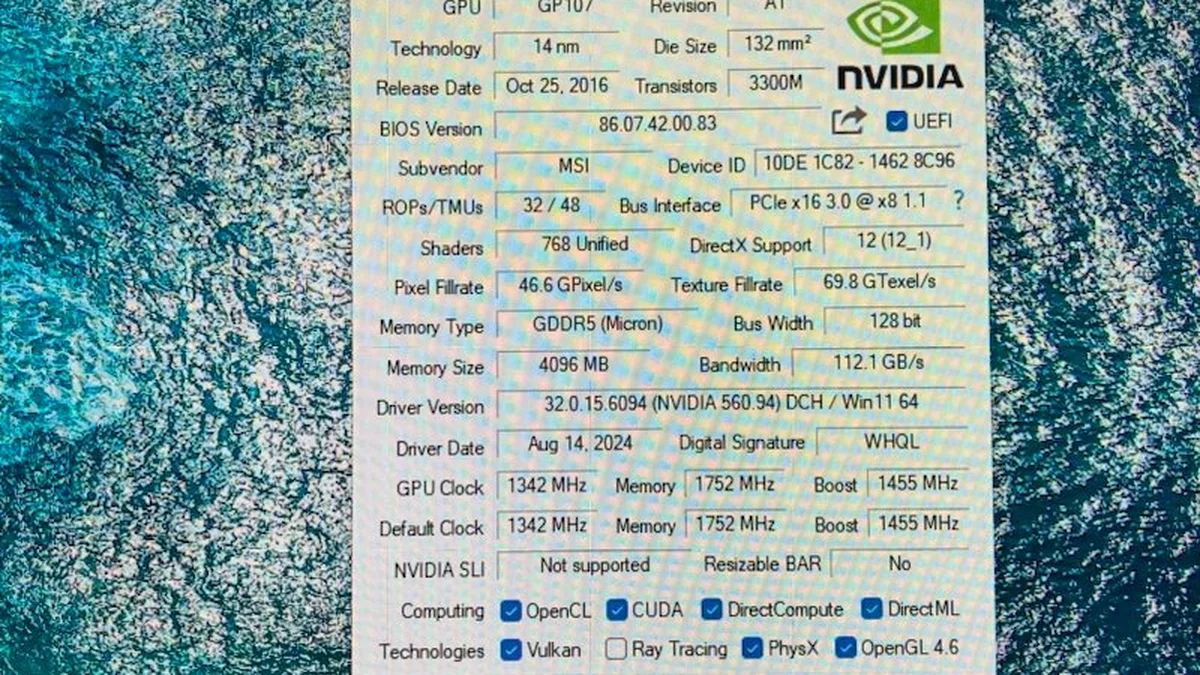
First, find what your card negotiated. GPU-Z shows the link under Bus Interface, with the current speed and the card maximum. Second, put the card under load before you read it; the link drops to a slower speed at idle. Third, check the motherboard manual for the slot wiring, since a second full-length slot may run at x8 or x4 even on a good board. Fourth, a second M.2 drive can split the top slot to x8 on some boards. On a Gen 5 board, that still equals a Gen 4 x16 link. If GPU-Z shows x8 on a card that should run x16, reseat the card and check the manual for a shared lane. External GPUs face the same math with far fewer lanes. See our eGPU guide: eGPU bottlenecks: Thunderbolt and USB4.
Should you upgrade your board for PCIe 5.0?
No, not for the graphics card alone. A good AM4 or Z690 board with PCIe 4.0 x16 holds back even an RTX 5090 by only 1 to 3 percent. That gap sits inside run-to-run variance in many titles; spend the board money on a better GPU or CPU instead. Those change frame rates by far more; the exceptions are narrow. They are an x8 card on a PCIe 3.0 board. They are also an 8 GB card that spills at 1440p, or a second M.2 drive that splits your x16 slot. If you are building new anyway, take PCIe 5.0; it costs little extra on a current board and it covers future cards. But a platform swap just for the slot is money spent on a number, not on frames.
The bottom line on PCIe 4.0 vs 5.0 for GPUs
PCIe 4.0 vs 5.0 for GPUs is a closer race than the specs suggest. PCIe 5.0 doubles the bandwidth, yet gaming on a full x16 card barely notices, as the 5090 tests prove. One generation down costs 1 to 3 percent, and two generations down costs about 1 to 4 percent. Lane count is the real story, since an x8 card on an older board loses far more than any x16 flagship. So check your card lanes and VRAM size before you worry about the generation number. AI work and DirectStorage games lean on the link harder than gaming does. Our storage guide covers the DirectStorage side: PCIe 5.0 SSD gaming: DirectStorage reality. If frames still fall short after that check, run your exact pair through the GPU bottleneck calculator and fix the part that actually limits you.
Frequently asked questions
Does PCIe 5.0 improve gaming FPS over PCIe 4.0?
Barely, on a full x16 graphics card. GamersNexus tested an RTX 5090 across PCIe 5.0 and 4.0, and Gen 4 matched Gen 5 within about 1 to 3 percent. The GPU keeps most game data in its own VRAM, so the link rarely limits it. The gap grows only on x8 cards, PCIe 3.0 boards, or a card that runs out of VRAM.
Is PCIe 5.0 x8 the same as PCIe 4.0 x16?
Yes, in bandwidth; each PCIe generation doubles per-lane speed. So 8 lanes of Gen 5 carry the same 31.5 GB/s as 16 lanes of Gen 4. That is why a Gen 5 x8 card like the RTX 5060 Ti runs at full Gen 4 x16 speed. The same math makes Gen 4 x8 equal to Gen 3 x16; lane count and generation multiply.
Will an RTX 5090 lose performance on a PCIe 4.0 motherboard?
Only 1 to 3 percent, based on GamersNexus testing across 16 scenarios. In Dying Light 2 at 1440p, it scored 216.1 FPS on Gen 5, 215.5 on Gen 4, and 215.4 on Gen 3. That gap sits inside normal run-to-run variance in many titles. Keep your PCIe 4.0 board and spend the money on a better card or CPU instead.
Why do x8 graphics cards suffer more on older boards?
An x8 card has half the lanes of an x16 card; every generation step halves its bandwidth again. On a PCIe 4.0 board, an RTX 5060 Ti runs at PCIe 4.0 x8, or about 15.8 GB/s. ComputerBase measured about 59.4 FPS on PCIe 5.0 versus 55.82 FPS on PCIe 4.0 across 27 games at 1440p. The loss grows worse when the 8 GB pool overflows.
How do I check my PCIe link speed and lane width?
Use GPU-Z and look at Bus Interface; it shows the negotiated link and the card maximum. Read it while the card is under load; the link drops to a slower speed at idle to save power. If it shows x8 on a card that should run x16, reseat the card; check the motherboard manual for shared lanes. A second M.2 drive can split the top slot to x8.
Does PCIe 5.0 matter for AI or DirectStorage workloads?
Yes, more than for gaming; local AI work streams model weights and cache between system RAM and the GPU. Multi-GPU AI traffic also crosses the bus; directStorage games stream assets from the SSD too. For pure gaming on one card, the generation gap stays small.
How this guide was prepared
This guide uses GamersNexus RTX 5090 testing across PCIe 3.0, 4.0, and 5.0. It also uses ComputerBase testing of the 8 GB RTX 5060 Ti. The bandwidth tables come from Misar, Windows Forum, and XDA Developers. The VRAM spill figures come from those same testers. No frame rates of our own are claimed. This guide explains published tests, not a benchmark we ran.
Last updated: November 12, 2026