
Key takeaways
- Prove the update caused it first. Check Reliability Monitor and the update history before you change settings.
- A clean GPU driver reinstall is the most common fix. Windows Update often installs a generic driver.
- Windows resets the power plan to Balanced after updates. Set it back to High performance.
- Shader cache stutter fades on its own. Let the cache rebuild instead of reinstalling the game.
- Roll back the update only when the fixes above fail. It is the last resort, not the first step.
First, prove the update caused it
Do not change settings before you know the update caused the problem. Press Windows key + R, type perfmon /rel, and press Enter. Reliability Monitor shows a timeline of updates, driver installs, and crashes. Match the date the stutter started to the date of an update. Then open Settings, Windows Update, Update history, and note the exact update. The table below maps each symptom to its likely cause, so you start with the right fix. The slowest frames, called 1% lows, show a CPU limit first. For the frame-time story in full, see this: stuttering and frame time: 1% lows explained.
| Symptom | Likely cause | Start with |
|---|---|---|
| FPS down 20% to 40% in every game | Power plan reset, or a bad update | Fix 3, then Fix 2 |
| High FPS, yet motion feels jagged | Frame pacing or overlays | Fix 3, then Fix 5 |
| Big hitch when entering new areas | Shader cache cleared | Fix 4 |
| Stutter after 10 to 20 minutes | Overheating, throttling | When nothing works |
Fix 1: reinstall your GPU drivers cleanly
Outdated or wrong GPU drivers are the single most common cause of FPS drops on Windows 11. Windows Update often installs a generic Microsoft display driver, not the latest gaming driver from your GPU maker. Download the latest driver directly from NVIDIA, AMD, or Intel, and install it. If the problem started after a driver update, install the previous version instead, since regressions in new drivers are common. For stubborn cases, do a full clean reinstall with DDU (Display Driver Uninstaller). It removes every trace of the old driver before you install the new one. Check your own pair after the reinstall with the free tool: bottleneck calculator.
Fix 2: roll back the Windows update
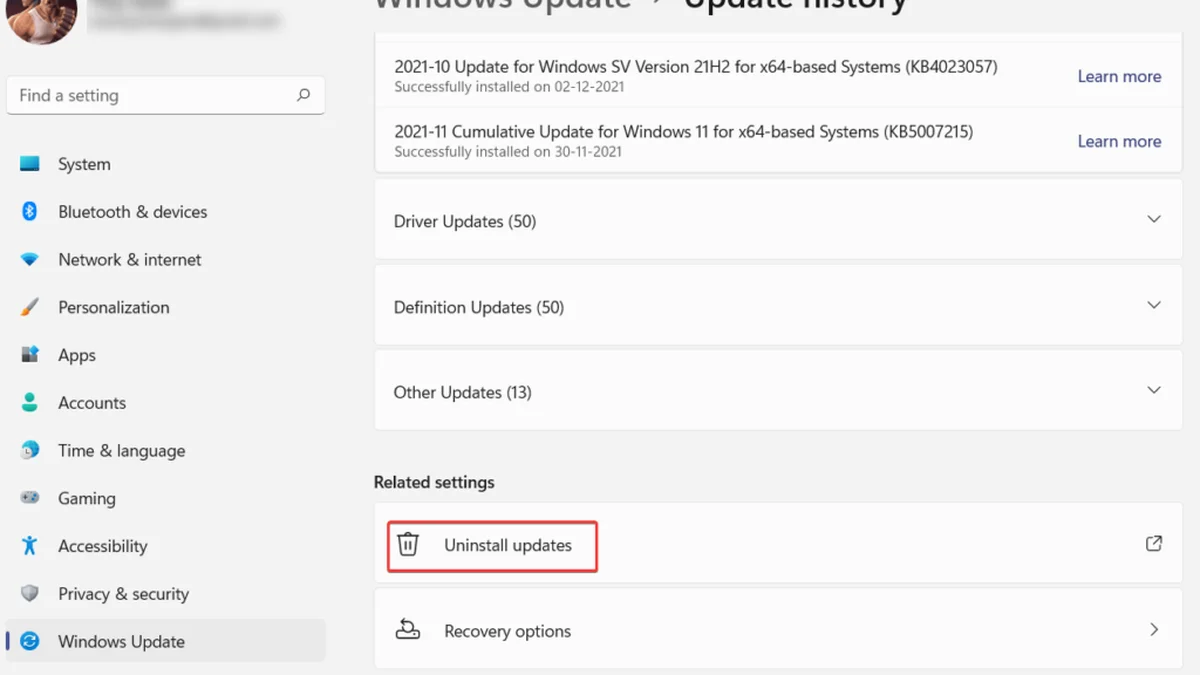
If the stutter started right after a specific update, remove that update. Go to Settings, Windows Update, Update history, and use Uninstall updates to remove it. You can also use Go back if the option is still available, since Windows keeps it for a limited window after major updates. Pause updates for a week after the rollback, so Windows does not reinstall the same update overnight. This is the last resort, not the first step, since an update also carries security fixes.
Fix 3: reset your power plan and gaming settings
Windows resets the power plan to Balanced after updates, and Balanced throttles the CPU between frames. That inconsistency shows up as stutter even when average performance looks fine. Go to Settings, System, Power, and set Power mode to Best performance. Then turn on Game Mode in Settings, Gaming, Game Mode. Then turn on Hardware-Accelerated GPU Scheduling in Settings, System, Display, Graphics, Change default graphics settings. HAGS moves GPU scheduling from the CPU to the GPU itself, and it helps on most modern GPUs. It needs Windows 11, a Windows Display Driver Model (WDDM) 2.7 or newer driver, and a supported GPU.
Fix 4: clear the shader cache and let it rebuild
Windows updates can clear or invalidate the DirectX Shader Cache, so the game must recompile shaders as you play. That shows up as a severe hitch when you enter a new area. It disappears when you repeat the action. Do not reinstall the game. Play for 20 to 30 minutes and let the cache rebuild, and the hitches fade. You can also clear the cache yourself in Settings, System, Storage, Temporary files, DirectX Shader Cache, then let it rebuild from scratch.
Fix 5: kill background load and overlays
Xbox Game Bar, Discord overlay, GeForce Experience, OBS, browser tabs, and cloud sync tools can spike CPU or GPU usage. A spike at the wrong moment causes a dropped frame. Go to Settings, Gaming, Xbox Game Bar and toggle it off. Then go to Captures and make sure background recording is disabled. Close browser tabs and cloud sync tools while you play. Check that Windows is not downloading an update mid-game, in Settings, Windows Update. For the RAM story in full, see this: how much RAM do you need for gaming in 2026.
Fix 6: repair Windows files
Files get corrupted during a bad update, and the effects show up in frame-time consistency. Open Command Prompt as administrator, type sfc /scannow, and press Enter. This scans protected Windows system files and replaces corrupted ones. Once SFC finishes, run DISM /Online /Cleanup-Image /RestoreHealth. This repairs the Windows image itself, which SFC draws from. If the stutter was caused by corrupted files from a bad update, this usually sorts it.
When nothing works
Check temperatures first. A CPU or GPU that hits its temperature limit slows itself down. Sustained FPS drops after 10 to 20 minutes of play are the classic sign. A GPU sustained above 85 to 90 degrees Celsius, or a CPU pinned at 95 to 100 degrees, means throttling. Clean the fans, replace dried thermal paste, and check that the case has airflow. Check the drive next. The game must sit on an SSD, since a hard drive causes texture streaming lag. Memory Integrity, part of Core Isolation, can cost 5% to 15% in GPU-bound games, per one guide. It is a security feature, so turning it off trades security for frames. For the full check method, see this: how to check for a CPU bottleneck.
| Fix | Time | When to use it |
|---|---|---|
| Clean driver reinstall | 15 minutes | First, always |
| Power plan + Game Mode + HAGS | 5 minutes | First, always |
| Shader cache rebuild | 30 minutes of play | Hitch in new areas |
| Kill overlays + background apps | 5 minutes | Random spikes |
| SFC + DISM repair | 20 minutes | After a bad update |
| Roll back the update | 30 minutes | Last resort only |
The bottom line on FPS drops after Windows update
FPS drops after Windows update are usually a settings problem, not a hardware problem. Start with a clean driver reinstall and a power plan reset, since those two fixes solve most cases. Let the shader cache rebuild, kill the overlays, and repair Windows files before you roll back the update. Check your pair first on the CPU bottleneck calculator before you spend on new parts. For the tier below your card, see this: best CPU for RTX 5060 and 5060 Ti. The full price story is here: GPU prices rising November 2026: buy before Black Friday.
Frequently asked questions
Why did my FPS drop after Windows update?
Windows updates change drivers, reset power plans, and clear the shader cache, and each one causes a different kind of stutter. The update often installs a generic Microsoft display driver instead of the latest gaming driver. It also resets the power plan to Balanced, which throttles the CPU between frames. Check Reliability Monitor to prove the update caused it.
How do I fix FPS drops after a Windows 11 update?
Start with a clean GPU driver reinstall from NVIDIA, AMD, or Intel, since that is the most common fix. Then set the power plan to Best performance, turn on Game Mode, and turn on Hardware-Accelerated GPU Scheduling. Kill Xbox Game Bar and background recording, and let the shader cache rebuild. Roll back the update only when those fixes fail.
Should I roll back a Windows update that broke my games?
Only as a last resort. Go to Settings, Windows Update, Update history, and use Uninstall updates to remove it. Pause updates for a week after the rollback, so Windows does not reinstall the same update overnight. An update also carries security fixes, so try the driver reinstall and the power plan reset first.
Does Game Mode help FPS after a Windows update?
Yes, in most cases. Game Mode stops Windows Update from installing drivers and stops background tasks from stealing CPU time while you play. Turn it on in Settings, Gaming, Game Mode. Pair it with Hardware-Accelerated GPU Scheduling, which moves GPU scheduling from the CPU to the GPU itself and helps on most modern GPUs.
Why do new areas stutter after a Windows update?
The update cleared or invalidated the DirectX Shader Cache, so the game must recompile shaders as you play. That shows up as a severe hitch when you enter a new area. It disappears when you repeat the action. Play for 20 to 30 minutes and let the cache rebuild, and the hitches fade.
Can Memory Integrity cause FPS drops after a Windows update?
Yes. Memory Integrity, part of Core Isolation, is a kernel-level security feature that adds CPU overhead. One guide puts the cost at 5% to 15% in GPU-bound games, with 1% lows hit harder. Turning it off trades security for frames, so keep it on unless your machine is only for gaming and you avoid untrusted software.
How this guide was prepared
This guide uses the published troubleshooting of AxeeTech, CloudHouse Technologies, Vivid Repairs, and MyTechnician, and the Windows settings paths those guides document. The fixes are ordered by how often they solve the problem, not by how dramatic they sound. No specific update number is named, since Microsoft changes them with every release.
Last updated: November 11, 2026